A calculator is not an invoice
The GST calculator is for the split. The invoice is the record.
GST invoicing
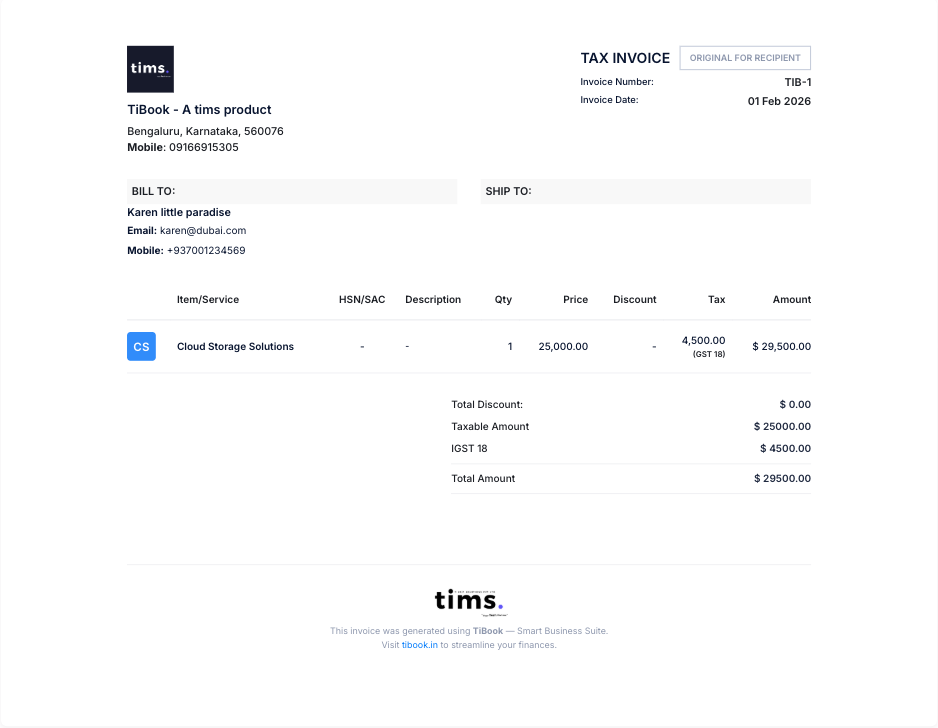
The tax invoice is the product. TiBook calculates CGST, SGST, or IGST on the line — then you or your CA file the return.
₹0
GST tax invoices on Startup — no card
HSN / SAC
On the item, with a tax group
No filing
We do not submit GSTR-1 or mint IRNs
What it is
GST billing software has to print a legal tax invoice: GSTIN, HSN or SAC, place of supply, and the right tax split. TiBook does that on Startup at ₹0.
We do not generate e-invoice IRNs, do not file GSTR-1 or GSTR-3B, and do not log into the GST portal as you.
No GST return filing. No IRN. No e-way generation. Signature on the PDF is an image, not a DSC.
Why it matters
The GST calculator is for the split. The invoice is the record.
A NIC/GSTN API. We do not mint IRNs. See the e-invoice page.
A movement document on the government portal. We store the number you already generated.
A signature image is not a Digital Signature Certificate.
How to
Company profile. Intra-state CGST+SGST; inter-state IGST from place of supply.
Goods vs services. Rate from the tax group. Confirm slabs with your CA after rate changes.
Party GSTIN, lines, prefixes. Credit notes for corrections.
PDF, WhatsApp, payment in. Signature from company settings.
Sales summary. They file. We do not log into the GST portal as you.
Guides: Sales invoice · HSN and SAC · GST calculator
Product
B2B and B2C with tax groups. Prefixes so numbers stay unique.
Goods carry HSN; services carry SAC. Rate from the tax group on the item.
Credit notes for returns. Quotations convert to invoices when the job is on.
Sales, purchases, outstanding. SMB adds ledgers. Filing stays on the portal.
Authorised signatory on the PDF. Not DSC. Not IRN.
Confirm invoice type with your CA. The software still prints what you configure.
Legal tax invoice fields
GSTIN, HSN/SAC, tax split, invoice number.
Filing vs billing named separately
If they file, they should say GSP/portal. We do not file.
IRN honesty
See our e-invoice page if that is the search.
| Need | GST calculator / Excel | TiBook |
|---|---|---|
| Tax invoice | You format. | The product. |
| GSTR-1 | You or CA. | You or CA. We do not submit. |
| IRN | Portal / GSP. | Not generated. |
| E-way | Portal. | Number stored only. |
Pricing
Start on Startup. Add SMB for POS, payroll, and ledgers. Recurring is Enterprise.
Startup
₹0
GST invoices, quotations, delivery notes, expenses, payments, basic inventory, P&L, daybook, outstanding. No credit card.
SMB
₹199/mo
Retail and Restaurant POS, payroll, extra users, and the accounting app (ledgers, journals, trial balance).
Enterprise
₹399/mo
Everything on SMB plus automated recurring invoices.
Full comparison on pricing.
Any Indian GST-registered MSME that bills in INR. Composition dealers should confirm invoice type with their CA.
No GST return filing. No IRN. No e-way generation. Signature on the PDF is an image, not a DSC.
Create GST bills on Startup. Filing and IRN stay where the law puts them.
Add signature to invoice · GST calculator · GST e-invoice (what we do not do) · Pricing