The best inventory management software is not the one with the longest feature list. It is the one that keeps your stock accurate through the transactions your team already performs.
For most small and growing businesses, that means sales, purchases, returns, locations, alerts, and reports working together—without turning every stock update into a separate job.
A healthy inventory loop
Start with the workflow
What inventory management software should actually do
Inventory software is a transaction system, not merely a digital stock list. It should explain what you have, where it is, why the quantity changed, and what your team should do next.
Without a connected system
A sale is entered in billing
Someone updates a spreadsheet later
Returns wait for manual correction
The purchase decision uses stale numbers
With billing-linked inventory
Invoice confirms the sale
Available stock updates
Item movement is recorded
Low-stock view changes
Sales report stays aligned
The owner sees one version of truth
This connection matters because stock errors rarely begin in the report. They begin when a real movement—a sale, purchase, return, transfer, or adjustment—is missing or entered twice. The right software makes the correct entry the easiest path.
Every stock movement has a direction—your software should record all six
Purchase
Goods received into stock
Sale
Invoice reduces available stock
Sales return
Returned goods come back in
Purchase return
Goods sent back to supplier
Transfer
Stock moves between locations
Adjustment
Damage, count corrections, samples
Feature checklist
The six capabilities that matter most
Feature names vary between products. Evaluate the outcome each capability creates for your daily operations.
Billing-linked stock
Sales, purchases, returns, and credit notes should update inventory without duplicate entries.
Location-wise control
Know what is available at each shop, warehouse, or godown—not only the company-wide total.
Barcode-ready operations
Create labels, scan items at the counter, and reduce product-selection errors during busy hours.
Actionable alerts
Low-stock and reorder information should tell your team what needs attention before a sale is lost.
Item-level traceability
Batching and serialisation help track expiry-sensitive or individually identifiable products.
Useful reports
Stock valuation, movement, sales, purchases, and slow-moving items should lead to better buying decisions.
Stock level of one item over a month
Without the threshold, the team notices the shortage only when a customer asks for the item. With it, the reorder happens while stock is still available—so the sale on day 16 is never lost. (Illustrative example.)
One item, three locations, one answer
A company-wide total of 1,654 units hides the fact that one shop is nearly out. Location-wise stock makes the transfer decision obvious.
Main godown
1,240 units
Shop — MG Road
318 units
Shop — Station Road
96 units · low
Transfer entry: 150 units, Main godown → Station Road. One entry updates both locations and leaves an audit trail.
Choose the right category
There is no single “best” system for every business
A shop with two counters, a distributor with several godowns, and a manufacturer with production planning do not need the same software.
Billing + inventory software
Practical for most SMBsRetailers, wholesalers, distributors, and growing small businesses
Strength
Billing and stock stay connected in one daily workflow
Verify before choosing
Check depth for batching, serialisation, and multiple locations
Standalone inventory software
Stock-focused teams with separate accounting systems
Strength
Deeper stock controls without replacing the finance stack
Verify before choosing
Integrations can add cost and reconciliation work
ERP
Large or process-heavy organisations
Strength
Broad control across procurement, production, finance, and operations
Verify before choosing
Longer implementation, training, and higher total cost
Spreadsheet or manual register
Very small catalogues with infrequent movement
Strength
Familiar and inexpensive to start
Verify before choosing
No automatic updates, weak audit trail, and difficult multi-user control
Match the business
Inventory priorities change by industry
Retail & FMCG
Typical need: Fast billing, barcode scanning, units, and low-stock visibility
Choose speed and automatic stock deduction at checkout.
Wholesale & distribution
Typical need: Bulk purchases, location-wise stock, transfers, and receivables
Choose strong purchase-to-sale traceability and reporting.
Pharma & expiry-led stock
Typical need: Batch details, expiry awareness, and disciplined stock rotation
Confirm the exact batch and expiry workflow before buying.
Electronics & hardware
Typical need: Serialised products, warranty context, and unit-level movement
Choose serialisation and clear sales-history lookup.
Reports that earn their place
Good software tells you where the money sits
Stock reports are only useful when they change a buying decision. The classic example: value is concentrated in far fewer items than most owners expect.
Not every item deserves the same attention
ABC analysis is a common rule of thumb: a small share of items usually holds most of your stock value. Good software makes this split visible in its valuation and movement reports.
A items
Count often, set tight reorder levels, watch pricing.
B items
Review on a regular cycle with standard thresholds.
C items
Keep simple rules; avoid over-ordering slow movers.
See it in practice
What a billing-linked stock view looks like
A single item screen should show stock level, low-stock status, SKU, and value together—because that combination is what a reorder decision needs.
TiBook for inventory
Stock visibility belongs beside billing
TiBook connects inventory with the wider business workflow: invoicing, purchases, POS, reports, and item management. That gives growing teams a simpler path than maintaining separate billing and stock systems.
- Track products across multiple locations
- Use batching and serialisation where needed
- Generate barcodes and support faster counter billing
- Surface low-stock items on the dashboard
- Connect inventory value with business reporting
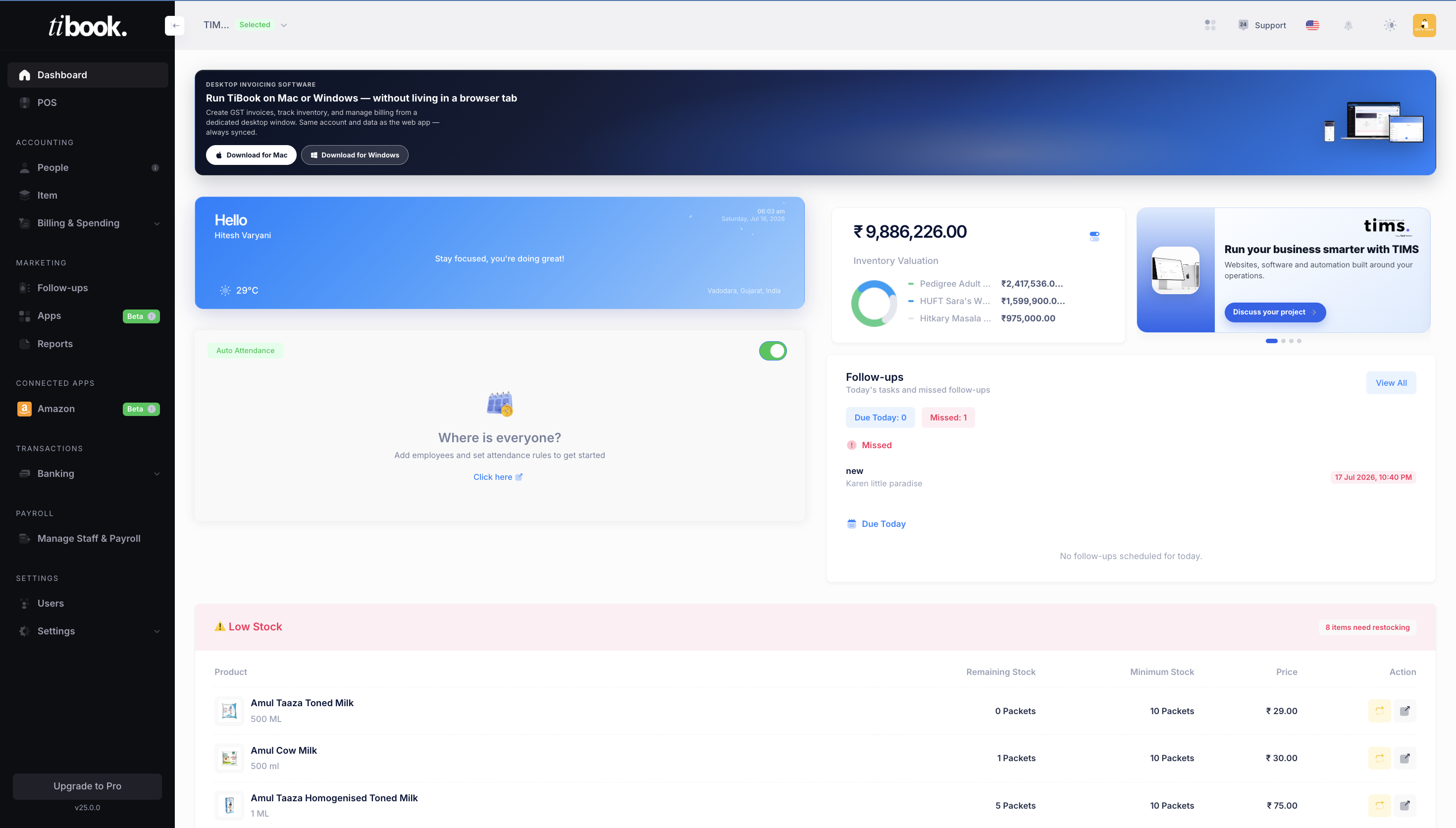
Low stock, made visible
The dashboard turns item thresholds into a clear restocking queue.
Buyer’s checklist
Evaluate software with real transactions—not a feature brochure
A short hands-on trial reveals more than a long sales call. Use the same sample products and scenarios in every tool you compare.
Every sale and return updates stock automatically
Daily accuracy
Create a bill, cancel or return it, then verify stock
Purchases and opening stock are easy to enter
Faster setup
Import a sample product list and purchase bill
Stock is visible by location
Prevents hidden shortages
Transfer an item and inspect both locations
Low-stock information is clear
Protects sales
Set a threshold and trigger it
Reports reconcile with transactions
Trustworthy decisions
Trace one report number back to source entries
Roles and permissions match the team
Safer collaboration
Test with an owner and staff login
The product remains simple at peak hours
Adoption
Ask the actual counter or warehouse user to trial it
Total cost is more than the subscription. Include setup, data cleanup, training, devices, barcode hardware, integrations, and the time required to reconcile systems that do not share data.
From trial to trustworthy data
A five-step implementation plan
Software cannot correct an unclear process by itself. A controlled rollout gives your team reliable opening data and a habit for recording every movement.
Clean the item master
Standardise product names, SKUs, units, tax rates, opening quantities, and reorder levels before import.
Map your real stock flow
Document purchases, sales, returns, transfers, damage, and adjustments so each movement has one clear process.
Pilot with one location
Run real transactions with a small team, compare system stock with physical stock, and fix setup gaps.
Train by role
Teach counter staff, purchase teams, warehouse users, and owners only the workflows each role needs.
Set a review rhythm
Review low stock, adjustments, slow movers, valuation, and exceptions weekly until the data is dependable.
Final recommendation
Choose the smallest system that can reliably handle your real complexity. If your business sells products and already creates invoices or purchase entries, start by evaluating billing-linked inventory. Move toward a specialised warehouse system or ERP only when workflows such as production, advanced fulfilment, or complex approvals genuinely require it.
TiBook is a strong fit for growing businesses that want inventory, invoicing, POS, purchases, and reports in one platform—without making a heavyweight implementation the first step.
Frequently asked questions
Questions businesses ask before switching
Which is the best inventory management software for a small business?
The best choice is the one your team can use consistently and that matches your stock complexity. For many retailers, wholesalers, and service-plus-product businesses, billing-linked inventory is the practical choice because invoices, purchases, and stock movement stay in one system.
Can inventory management software work with GST billing?
Yes. A suitable system for Indian businesses should keep item tax details, invoices, purchases, and inventory movement connected. Always test your actual tax and document workflow during the trial.
Do I need an ERP to manage inventory?
Not necessarily. An ERP is useful when procurement, manufacturing, finance, and operational approvals are highly complex. A smaller business can often get better value and faster adoption from focused billing and inventory software.
How does inventory software reduce stock errors?
It creates a consistent record for each movement. When sales, purchases, returns, transfers, and adjustments are entered correctly, the available quantity updates from those transactions instead of depending on repeated manual calculations.
What should I test during a free trial?
Use your own products and complete a full cycle: import items, record a purchase, make a sale, process a return, transfer stock, trigger a low-stock threshold, and verify the reports. A polished dashboard alone is not enough.
Put the checklist into practice
See how TiBook handles your inventory workflow
Add a few real products, record a purchase and sale, then check the stock movement and low-stock view yourself.